
利用Douyin_TikTok_Download_API项目搭建抖音下载机器人
搭建API
项目地址: Douyin_TikTok_Download_API
version: '3.8'

services:
  douyin_tiktok_api:
    image: evil0ctal/douyin_tiktok_download_api:latest
    container_name: douyin_tiktok_api
    ports:
      # 9999为外部映射端口
      - "9999:80"
    volumes:
      # 映射规则:- "本地路径:容器内路径"
      # 注意:该项目在 Docker 容器内的根目录通常是 /app
      - ./configs/douyin_web/config.yaml:/app/crawlers/douyin/web/config.yaml
      - ./configs/tiktok_web/config.yaml:/app/crawlers/tiktok/web/config.yaml
      - ./configs/bilibili_web/config.yaml:/app/crawlers/bilibili/web/config.yaml
      # (可选) 如果你还需要截图里的挂载持久化数据或环境变量,可以像下面这样写:
      - ./data:/data
    environment:
      # (可选) 截图里的环境变量设置方式
      - TZ=Asia/Shanghai  # 设置时区为上海时间
    restart: unless-stopped
docker compose up -d 一键部署即可,开放9999端口
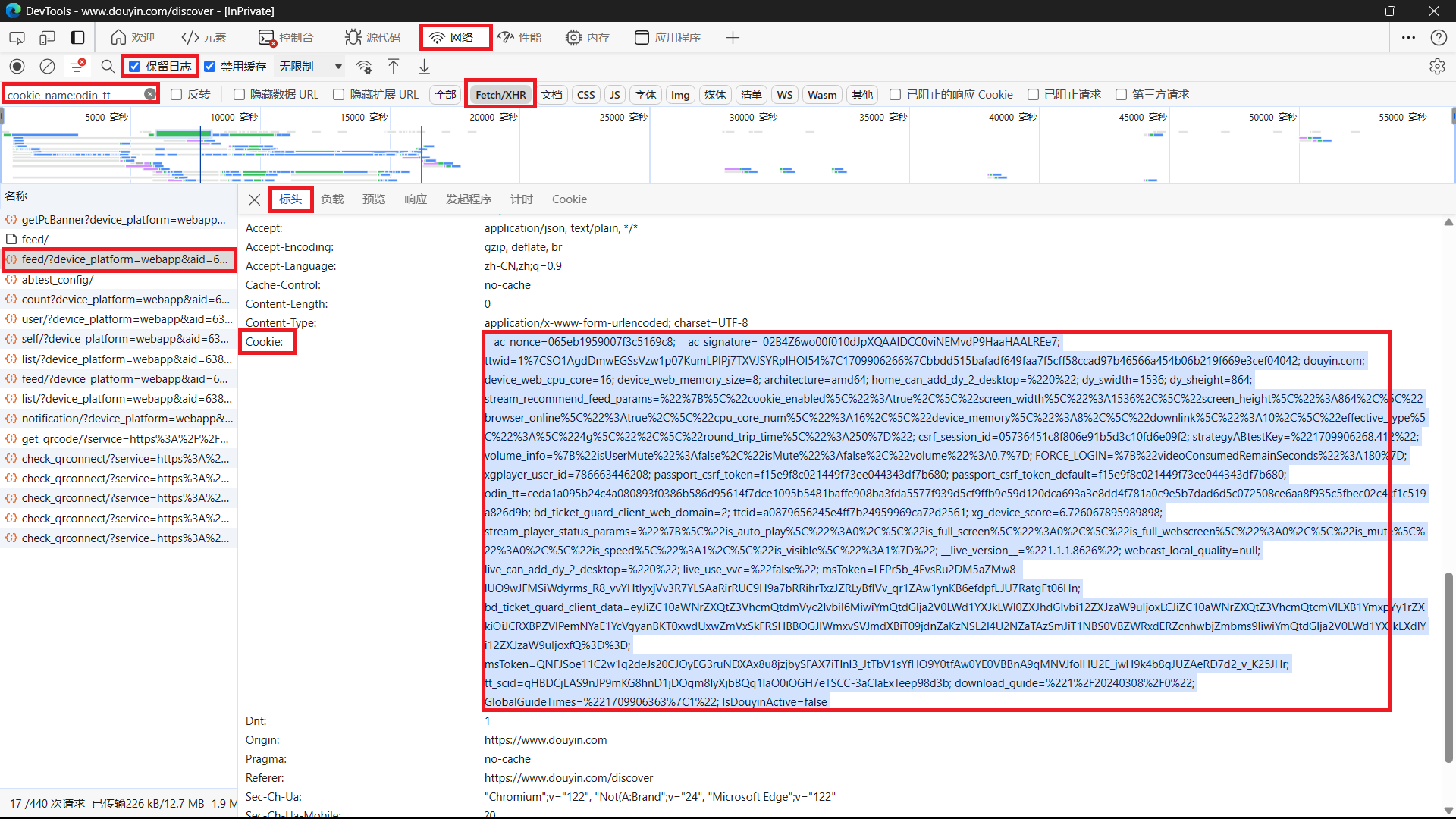
获取抖音cookie
- 打开浏览器(可选无痕模式启动),访问
https://www.douyin.com/ - 登录抖音账号(可跳过)
- 按
F12打开开发人员工具 - 选择
网络选项卡 - 勾选
保留日志 - 在
筛选器输入框输入cookie-name:odin_tt - 点击加载任意一个作品的评论区
- 在开发人员工具窗口选择任意一个数据包(如果无数据包,重复步骤7)
- 全选并复制
Cookie的值 - 替换掉
configs/douyin_web/config.yaml中的cookie值
部署Telegram下载机器人
利用上一步部署的Douyin_TikTok_Download_API,搭配Telegram Bot,实现发分享链接给Bot,Bot传递到服务器,服务器下载完成后,再通过机器人传回到Telegram
部署bilibili下载引擎
新建bili_engine.py脚本如下
# bili_engine.py
import asyncio
import os
import time
import yt_dlp

# ================= 账户凭证区 =================
BILI_COOKIE_STRING = "enable_web_push=DISABLE;b_lsid=29补全你的bilibili cookie"
# ==============================================

async def process_bili(url, chat_id):
    """
    对外暴露的主函数:
    使用强大的 yt-dlp 引擎下载 B 站视频,
    并使用兼容旧版本 Python (3.7/3.8) 的线程池执行器,防止主程序卡死。
    """
    timestamp = int(time.time())
    final_mp4 = f"bili_final_{timestamp}_{chat_id}.mp4"

    ydl_opts = {
        'format': 'bestvideo+bestaudio/best',
        'outtmpl': final_mp4,
        'merge_output_format': 'mp4',
        'quiet': True,
        'no_warnings': True,
        'http_headers': {
            'User-Agent': 'Mozilla/5.0 (Windows NT 10.0; Win64; x64) AppleWebKit/537.36 (KHTML, like Gecko) Chrome/120.0.0.0 Safari/537.36',
            'Referer': 'https://www.bilibili.com/',
            'Cookie': BILI_COOKIE_STRING
        }
    }

    try:
        def download_worker():
            with yt_dlp.YoutubeDL(ydl_opts) as ydl:
                info = ydl.extract_info(url, download=True)
                return info.get('title', 'B站视频解析成功')

        print(f"🚀 [yt-dlp] 正在以线程池模式处理 B 站链接: {url}")

        # 🌟 核心兼容修改:获取当前事件循环,并用 run_in_executor 将任务送进默认线程池
        loop = asyncio.get_running_loop()
        video_title = await loop.run_in_executor(None, download_worker)

        if os.path.exists(final_mp4):
            print(f"🎉 [yt-dlp] 混流合成成功: {final_mp4}")
            return final_mp4, f"🎬 {video_title}"
        else:
            return None, "合并完成,但最终文件未在磁盘上生成"

    except Exception as e:
        print(f"❌ [yt-dlp] 运行出错: {str(e)}")
        return None, f"引擎下载出错: {str(e)}"
新建tiktok_download.py脚本如下
# bot_large_video.py
import traceback
from pyrogram import Client, filters
from pyrogram.types import InlineKeyboardMarkup, InlineKeyboardButton
import aiohttp
import re
import os
import time
import glob
import json
import subprocess

# ================= 新增:精准提取视频宽高的探测器 =================
def get_video_dimensions(file_path):
    """调用本机的 ffprobe 提取视频真实的宽高,防 Telegram 拉伸"""
    try:
        cmd = [
            "ffprobe", "-v", "quiet", "-print_format", "json",
            "-show_streams", file_path
        ]
        result = subprocess.run(cmd, capture_output=True, text=True)
        info = json.loads(result.stdout)

        for stream in info.get("streams", []):
            if stream.get("codec_type") == "video":
                width = int(stream.get("width", 0))
                height = int(stream.get("height", 0))

                # 处理带旋转元数据的横屏视频被错认成竖屏的问题
                tags = stream.get("tags", {})
                rotation = int(tags.get("rotate", 0))
                if rotation == 90 or rotation == 270:
                    return height, width  # 宽高互换

                return width, height
    except Exception as e:
        pass
    return 0, 0
# ====================================================================

# ================= 新增:像插件一样引入你的外部引擎 =================
from bili_engine import process_bili
# ====================================================================

# 配置区 (只保留抖音相关的)
API_ID = "12345"
API_HASH = "123456789"
BOT_TOKEN = "123:ABCDE"
ALLOWED_USERS = [123,456] # ⚠️ telegram用户白名单,记得改回你的真实 ID
TIKTOK_API_URL = 'http://127.0.0.1:9999/api/hybrid/video_data' #9999是上一步Douyin_TikTok_Download_API的开放端口,如果不是本机,127.0.0.1要改成你Douyin_TikTok_Download_API的公网IP

app = Client("tiktok_downloader_bot", api_id=API_ID, api_hash=API_HASH, bot_token=BOT_TOKEN)

def authorized_users_only(flt, client, message):
    if not message.from_user: return False
    return message.from_user.id in ALLOWED_USERS
allowed_filter = filters.create(authorized_users_only)

def extract_url(text):
    if not text: return None
    url_pattern = re.compile(r'https?://[-A-Za-z0-9+&@#/%?=~_|!:,.;]+[-A-Za-z0-9+&@#/%=~_|]')
    match = url_pattern.search(text)
    return match.group(0) if match else None

async def download_large_video(video_url, file_name):
    timeout = aiohttp.ClientTimeout(total=1800)
    async with aiohttp.ClientSession(timeout=timeout) as session:
        async with session.get(video_url, ssl=False) as response:
            if response.status == 200:
                with open(file_name, 'wb') as f:
                    async for chunk in response.content.iter_chunked(1024 * 1024):
                        f.write(chunk)
                return True
    return False

@app.on_message(filters.text & filters.private & allowed_filter)
async def handle_video_link(client, message):
    url = extract_url(message.text)
    if not url: return

    msg = await message.reply_text("⏳ 正在识别链接...")
    temp_file_name = f"video_{int(time.time())}_{message.chat.id}.mp4"
    final_video_path = None
    video_desc = "解析成功"
    reply_markup = None

    try:
        # 🟢 路由 1:交给外部的 bili_engine 脚本去处理
        if "bilibili.com" in url or "b23.tv" in url:
            await msg.edit_text("📺 识别为 B 站链接,已转交外部引擎处理...")

            # 直接调用外部脚本的函数,拿到处理好的 mp4 路径
            final_mp4, status_msg = await process_bili(url, message.chat.id)

            if not final_mp4:
                await msg.edit_text(f"❌ B站处理失败: {status_msg}")
                return

            final_video_path = final_mp4
            video_desc = "📺 B站视频 (服务器本地混流版)"
            reply_markup = InlineKeyboardMarkup([[InlineKeyboardButton("Source", url=url)]])

        # 🟢 路由 2:本脚本处理抖音
        else:
            await msg.edit_text("⏳ 识别为短视频链接,请求 API 中...")
            async with aiohttp.ClientSession() as session:
                async with session.get(f"{TIKTOK_API_URL}?url={url}") as response:
                    data = await response.json()

            video_url = None
            try: video_url = data['data']['video']['bit_rate'][0]['play_addr']['url_list'][0]
            except: pass
            if not video_url:
                try: video_url = data['data']['video']['play_addr']['url_list'][0]
                except: pass
            if not video_url:
                try: video_url = data.get('data', {}).get('video_data', {}).get('nwm_video_url_HQ') or data.get('data', {}).get('video_data', {}).get('nwm_video_url')
                except: pass
            if not video_url:
                video_url = data.get('data', {}).get('nwm_video_url_HQ') or data.get('data', {}).get('nwm_video_url')

            if not video_url:
                await msg.edit_text("❌ 解析失败。")
                return

            video_desc = data.get('data', {}).get('desc') or data.get('data', {}).get('aweme_detail', {}).get('desc') or "解析成功"
            reply_markup = InlineKeyboardMarkup([
                [InlineKeyboardButton("Source", url=url), InlineKeyboardButton("视频链接(临时)", url=video_url)]
            ])

            await msg.edit_text("⬇️ 正在缓存到服务器...")
            if not await download_large_video(video_url, temp_file_name):
                await msg.edit_text("❌ 视频下载失败。")
                return

            final_video_path = temp_file_name

        # ================= 统一上传阶段 =================
        await msg.edit_text("⬆️ 处理完成,正在提取原始画幅比例并上传...", reply_markup=reply_markup)

        # 🌟 核心修改 1:在上传前,精准拿到视频的真实宽高
        v_width, v_height = get_video_dimensions(final_video_path)

        # 🌟 核心修改 2:强制指定宽高,并开启流媒体支持
        await client.send_video(
            chat_id=message.chat.id,
            video=final_video_path,
            caption=video_desc,
            width=v_width,               # 强制锁死宽度
            height=v_height,             # 强制锁死高度
            supports_streaming=True,     # 开启流媒体边下边播优化
            reply_to_message_id=message.id,
            reply_markup=reply_markup
        )
        await msg.delete()

    except Exception as e:
        error_trace = traceback.format_exc()
        print(f"\n========== 异常 ==========\n{error_trace}\n======================")
        await msg.edit_text("❌ 发生内部错误,请查看日志。")

    finally:
        for file_to_clean in [temp_file_name, final_video_path]:
            if file_to_clean and os.path.exists(file_to_clean):
                os.remove(file_to_clean)

if __name__ == '__main__':
    print("🧹 清理残留文件...")
    for old_file in glob.glob("video_*.mp4") + glob.glob("bili_final_*.mp4") + glob.glob("temp_*.m4s"):
        try: os.remove(old_file)
        except: pass
    print("🚀 主程序已启动,外部 B 站引擎已挂载...")
    app.run()
启动
利用systemctl将tiktok_download.py写进开机自启服务内
[Unit]
Description=TikTok Downloader Telegram Bot
After=network.target

[Service]
# 指定运行该服务的用户
User=root
# 你的项目所在目录 (请确保这是你 tiktok_download.py 所在的文件夹)
WorkingDirectory=/root/tiktok
# 启动命令 (前面是 Python 的绝对路径,后面是脚本文件)
ExecStart=/usr/bin/python3 /root/tiktok/tiktok_download.py
# 如果 Bot 崩溃或被强杀,5 秒后自动重启
Restart=always
RestartSec=5
# 统一设置时区
Environment="TZ=Asia/Shanghai"

[Install]
WantedBy=multi-user.target
评论
暂无评论